
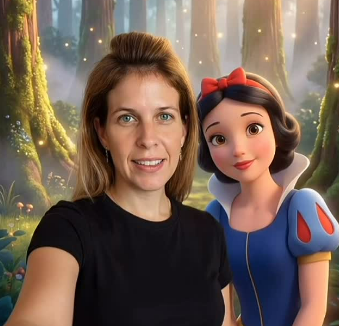
In a world flooded with AI visuals, only a few viral pieces truly stop the scroll. These Visuals have one element most creators overlook: movement with purpose.
In this guide, you will learn the exact framework behind creating hyper-realistic, one of a kind story-driven celebrity selfie videos that generate trust, attention, and emotional response. The process is designed for creators, brands, and marketers that want visuals that feel cinematic, authentic, and unforgettable. Let’s jump in.
Step 1: Plan the Path Before Creating Any Celebrity Selfie Images
Before generating even one single image for your celebrity selfie video, stop and ask yourself two essential questions:
- How does the character exit each scene?
- Where does the character enter next, and what is the transition between scenes?
At this stage, you are not choosing beautiful scenes or impressive characters. You are building a clear physical route.
Example:
Forest → Cliff → Sea → Snow → Castle
Without a defined route, the video will feel random, even if each individual image looks stunning.
At this point, do not present visuals yet. Focus on explaining the logic alone.
Step 2: Create Images in Higgsfield with a Video Mindset
Images are created in Higgsfield NanoBanana as frames extracted from a film.
Mandatory principles:
- One constant character throughout
- Consistent scale
- Similar framing
- Consistent body direction
In one word? Consistence is key!
Also allow enough physical space for the character to exit the frame
How it works:
Upload the photo of the person taking the selfie (you), and using NanoBanana Pro with detailed prompts, generate the images with celebrities to create a celebrity selfie combination.
Create a separate image for each stage in the route you planned.
Sample Prompt (Snow White)
Create a hyper-realistic, high-fidelity (8K) image based on the attached reference photo. Maintain the exact facial features, skin tone, bone structure, hairstyle, and expression of the attached person with zero alteration. No face swap. No beautification. The attached person is taking a casual handheld selfie with a realistic live-action interpretation of Snow White. They are standing on a fantasy forest film set, inspired by a live-action fairy tale movie. Soft natural light filters through tall trees. Crew members are visible adjusting lighting and cameras. Cables, reflectors, and film equipment are present. Directors and assistants are standing in the background. Snow White appears as a real human actress inspired by the classic animated character – fair skin, dark hair, classic color palette – cinematic and natural, not cartoon-like.
Step 3: Sequence Check
Before you start making the actual celebrity selfie video, review each image and ask:
- From which direction can the character exit?
- Does the character have a clear destination?
- Is there a physical reason to move?
Step 4: Create the Video in Higgsfield
In Higgsfield, use Image to Video with the Kling 2.5 Turbo model.
This is where the magic happens using the First Frame / Last Frame feature:
First Frame:
Upload the image of the current scene, for example a selfie with Snow White.
Last Frame:
Upload the image of the next scene, for example a selfie with Batman.
Prompt logic:
The video must describe clear physical movement — a sharp direction, purposeful running, exiting the frame. The run itself is the narrative bridge between worlds.
Step 5: The Transition Scene
The transition scene on your celebrity selfie video is the action that allows the brain to complete the gap between the first and last image.
Examples of prompt phrasing:
- Running through a forest that suddenly opens into a cliff.
- Jumping off the cliff as a trigger for the cut.
- Emerging from water as everything freezes around the character.
The change must happen during movement, not after a stop.
Universal Video Prompt Template
The celebrity selfie clip focuses on physical movement. The person exits the current space and moves with purpose in a clear direction. The camera follows naturally in a handheld perspective. The environment transforms as a result of the movement, not as a separate visual effect. There is no teleporting, no backward motion, and no movement toward the camera. The scene ends when the person reaches the next space.
Professional Tips for Celebrity Selfie Success
Cuts and jumps
Any jump, doorway crossing, or threshold is a natural cut point.
No drama
Do not extend jumps. No slow motion.
Include the film crew
Fantasy worlds feel like dreams. When directors and equipment appear in the background, the scene becomes believable. The crew provides authenticity. It is not the hero.
Transition timing
On celebrity selfie videos most transitions should be short, 2 to 2.5 seconds.
Story-driven transitions, such as role changes or world building, may run longer, 5 to 10 seconds.
Summary
Consistency is key!
Direction → Reason for movement → Cut timing
It’s all about the followthrough.
The moment you start treating a video as a sequence of actions instead of a sequence of images, everything clicks. Try it out, and you’ll see 🙂.
Good luck 🚀
Roni Bolelis creates and brands businesses with AI.
Follow for more guides and professional tips ✨
Legal Disclaimer and Copyright
This guide is intended for educational purposes and to demonstrate technological capabilities only. All referenced characters, including Disney characters, are the intellectual property of their respective rights holders. The author has no official affiliation with these companies. The images shown in this guide were created using artificial intelligence as artistic illustrations and are not official materials.

